The Mind Compiler

Reading code is the most important activity of a computer programmer. Ideally the code is then interpreted and ran as a thought experiment inside the programmer’s brain. This sounds hard, but as you learn an environment, the mind will eventually reach this level of tooling.

The ability to reason about code without running it, is the key to failing fast and often. Which you always want to do. Failing slow is painful. Just as Intellisense is a huge help for catching syntax errors early, not having to actually build & run your program, you can iterate much quicker.

Of course what happens if your internal transpiling mechanism and logic simulation units fail as you bite off more than your meat computer can handle?

Just press F5.

I recommend picking your favorite open source project and start reading. If you get stuck, just start dropping some breakpoints and calibrating your internal toolkit.

Big Idea Fridays

There are few speeches that cause me to read them multiple times. Dr. Hamming’s “You and Your Research” resonates deeply with me and is one of my favorites. Hamming, defines a work ethic and sprinkles the talk with antedotes that are both kind and relatable.

However you define great things

Dick Hamming

He gave this speech many times and prefer this written version: https://www.cs.virginia.edu/~robins/YouAndYourResearch.html

I like the idea of reserving Friday’s for thinking about deep problems.

Have a good weekend.

Building Your Own Lightsaber

If you can find a piece of software that does what you need in a timely manner and is within your budget, then by all means use it and move on.  But sometimes you need a feature or a flow that can’t be bought for any cost.  You must roll your own.

I’d run for the hills if you can’t stand computers, because the only thing worse than computers is programming computers.  But if you have the muster and the gumption you to can make the computer go beep.

Chances are there are ways to make it go beep without you writing your own software but what is the fun in doing that?

Automation

The Tool Makers Dilemma

Sometimes though, you just build to build.  This is very, very dangerous.  It is the state that I am in right now with the Session Link Engine.  I’ve learned and forgotten the web stuff a few times since I started with it in the late 90s.

The purpose of this build is to relearn the web and ship a web app.  So what do we make?  A modern wiki: https://sessionlink.cryptide.com/

Session Link 1.0

Update Summer 2020:

This was never meant to be a single player game… Perhaps the biggest change in humanity over the past 200 years is the ability to communicate over the wire or the air thousands of miles away instantly.

The Hive Mind is a real thing and is buzzing with all of your data.  The aggregate.

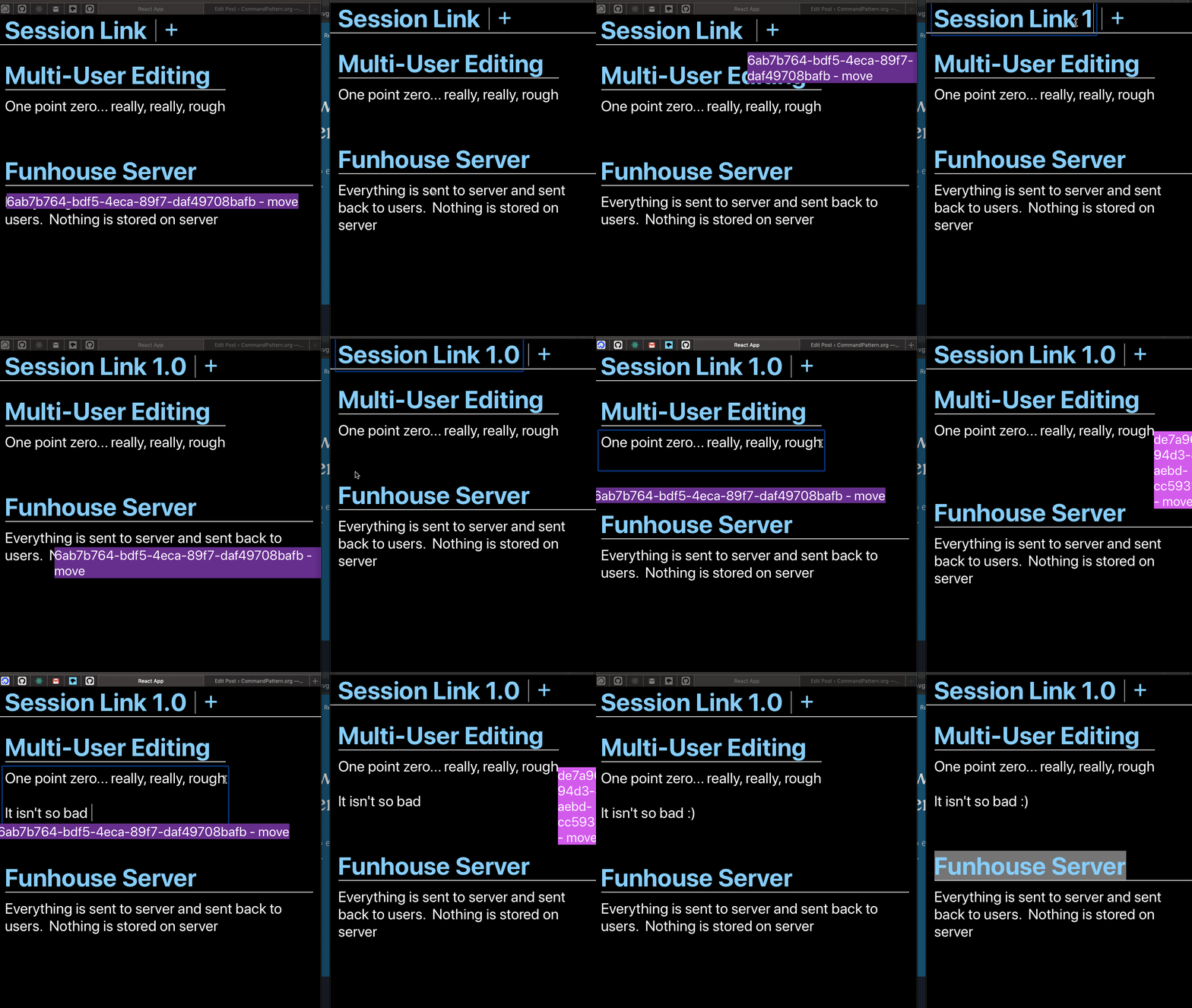
I’ve been working on a proof of concept prototype for multi-user editing.  Co-design if you will.  Essentially a google docs shared cursor:

session_link_cursor_1p0.gif

This has been my side project for a few months and it uses Typescript, React, and WebSockets.  Beware that there is no privacy features yet. So be good.

https://sessionlink.herokuapp.com/?id=05efce93-4840-4c27-beac-bf8b181b9875

Open it up in two+ different browsers/machines etc 🙂

Standback google docs.

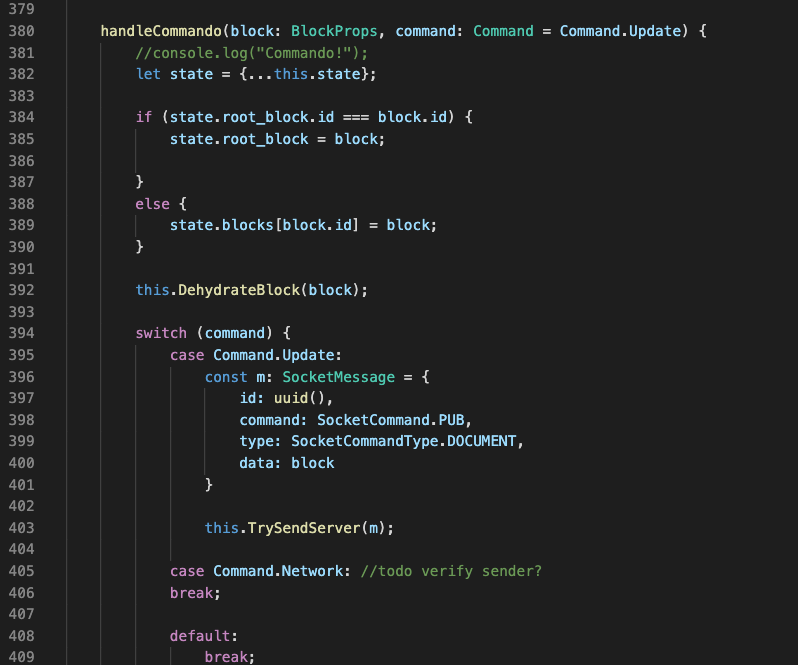
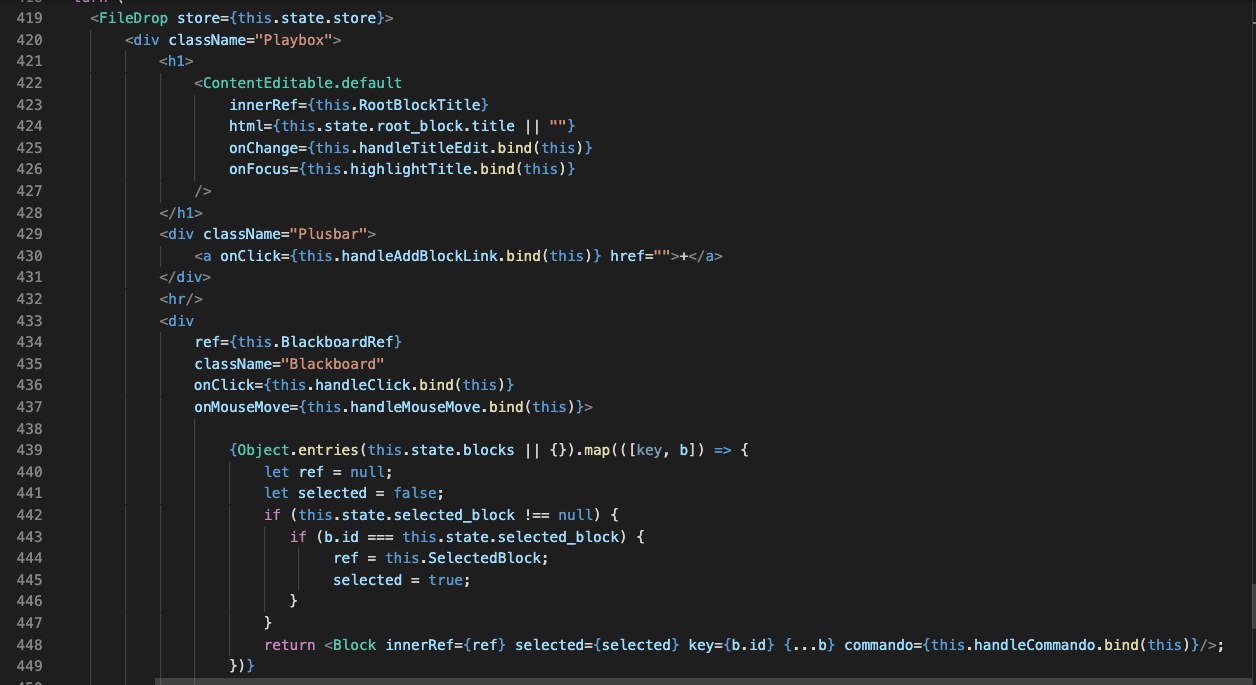
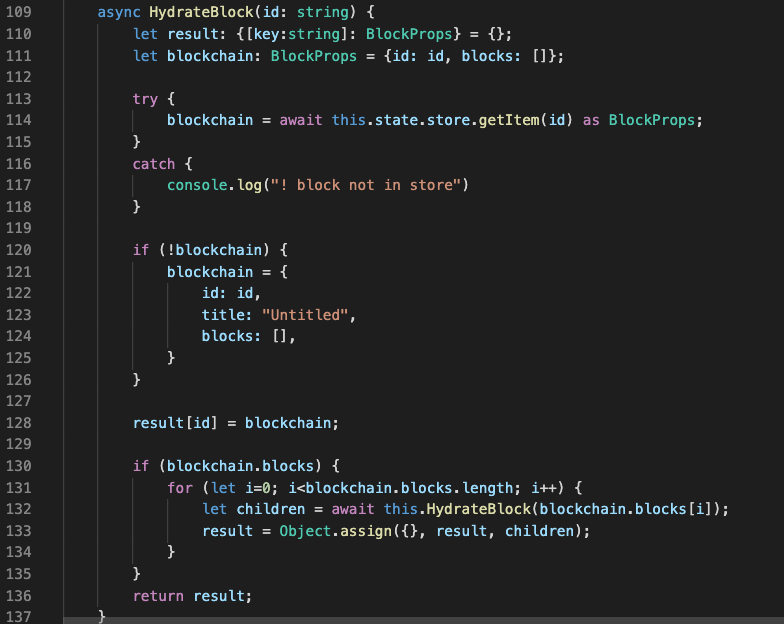
I will do a walk-through of the source code soon.  Here are some shots during development.

We still have callback hell here with my commando function.  It is passed into every block and is the way that everything updates.  Not sure if I will keep this but it works.

Screen Shot 2019-12-13 at 5.41.11 AM.png

Main render from “Playbox” the root component of app.  I have a file drop that isn’t being used yet.

Screen Shot 2019-12-13 at 5.45.21 AM.png

The kids these days call it hydration/dehydration instead of deserialize/serialize:Screen Shot 2019-12-13 at 5.42.03 AM.png

On the todo list:

  • Private Channels w/ XOR Key
  • JSON Deltas not full blobs for transmission of edits
  • Throttling server/client
  • Usernames/Colors not random
  • Actually Reseeding the data to new users
  • Collision Avoidance Schemes w/ Time travel
  • File Sharing
  • Markdown Editing
  • DataTable Editing

Stay tuned.

The Weekend Thrash

So you think you are almost there. You think one or two more hacking sessions could “do it” and you start the weekend thrash.

What is the difference between a clever hack and an unmaintainable pit of tar?

If you are in the Zone, then you of course nothing can stop you.  But I say stop and rethink your life.  You probably are building the wrong thing anyway.

I don’t roll on Shabbos!


walter-sobchak.jpg


Blaming the User

My favorite super-pattern in developing and supporting software.  Always assume the user is wrong.  Remember, you are User Number Zero, so… blame yourself.

Screen Shot 2018-07-08 at 8.51.40 AM.png

Defensive Programming is a technique similar to Defensive Driving. Always assume the user will break your program. Defensive programming will save you time in the long run by reducing support and increasing user satisfaction.

Its aim is to reduce the risk of collision by anticipating dangerous situations, despite adverse conditions or the mistakes of others – Defensive Driving – Wikipedia 2018

We must have a balance of making programs flexible enough to allow the user to use it for intentions unforeseen by the tool-makers themselves, and to ensure they don’t fall off the rails and lose data because they entered a word instead of a number.

Input Validation

  • Never trust Input Text Boxes
    • Always convert numerical values using ParseFloat or equivalent
    • Never  Eval() or Shell() with input string
    • Never use string to build SQL Query without proper escaping. see SQL Injection
    • Always trim whitespace at beginning and end of string
  • Give clear and actionable error messages when providing feedback to user on their incorrect inputs
  • … This post could go on for a while, TBF


Further Reading

Shipping a Beta

So you have done a demo of your application and your users want to use it for themselves.  How ready is your project to move from barely working prototype to an actual product?  Demos are deceiving.  Remember you only take a picture from the pretty side.

To be able to ship the prototype to beta is a huge step and sometimes can take too long.  Every day that goes by that the product isn’t in a user’s hands is another day without oxygen.  You are swimming further and further from the line.  Toe the line and ship that beta no matter what.

Some Questions to Help You Get Started

  • How does the user install or get your software?
  • Do you have a quick start 1 page tutorial or guide on basic usage?
  • Does it work in your user’s environments?
  • Does it really solve the users issue?
  • How often do they use it?
  • How fast can you ship another beta to fill all the holes they are sure to run into eventually?